

Read EPUB & MOBI books
Contents, bookmarks, search and progress recovery help you finish a book at your own pace.
File list → Open EPUB / MOBI
What you can do
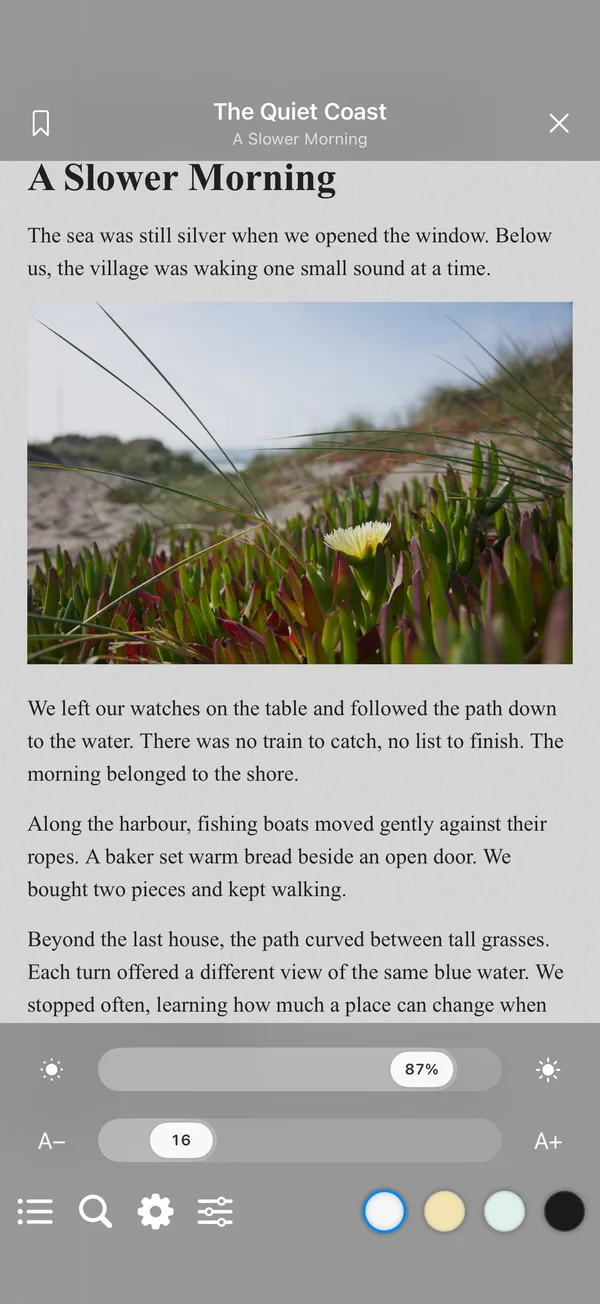
Read DRM-free EPUB and MOBI books with contents, bookmarks, full-text search and progress restoration. Adjust themes, fonts, text size and layout, then continue where you left off.
How to use it
- Open EPUB/MOBI from FileBox spaces, authorized device folders or iCloud folders. Download cloud files first, then tap again.
- The first MOBI opening converts the book on your device. Wait for processing; later openings reuse reading caches without changing the original.
- Tap the center to reveal tools. Use the bottom bar for contents, search, settings, reading progress and themes. Navigate with contents or search and add bookmarks.
- For reflowable text books, adjust text size, publisher fonts, line spacing, page margins and reading direction. Preview slider changes, then release to apply them to the text. Fixed-layout books retain their original layout. Reopening the same file restores progress.
- MOBI books recognized as image-based offer a Pages thumbnail grid and bookmarks in the contents panel. Eligible fixed-layout MOBI books show a crop icon in the bottom toolbar. Tap to crop side margins and tap again to restore the original view. The choice is saved per book and uses single-page viewing while enabled.
Before you start
Supports DRM-free EPUB 2/3 and unencrypted traditional MOBI, KF8 and hybrid files. MOBI input is limited to 128 MiB. DRM and enhanced books requiring interactive scripts are unsupported. Reference page numbers do not change with text size or screen size; cross-device progress sync is not promised. Clear converted reading caches in Storage analysis; they rebuild when needed. MOBI cropping changes the reading view without modifying originals and preserves top and bottom content. Mixed text/image, multi-image or unsuitable pages keep their original layout. This crop control is not a general feature for all EPUB or CBZ/CBR comics.