

Image editing
Convert WebP, GIF and Live Photos
Convert WebP to common formats, or save a GIF or Live Photo as a video.
Where to find it
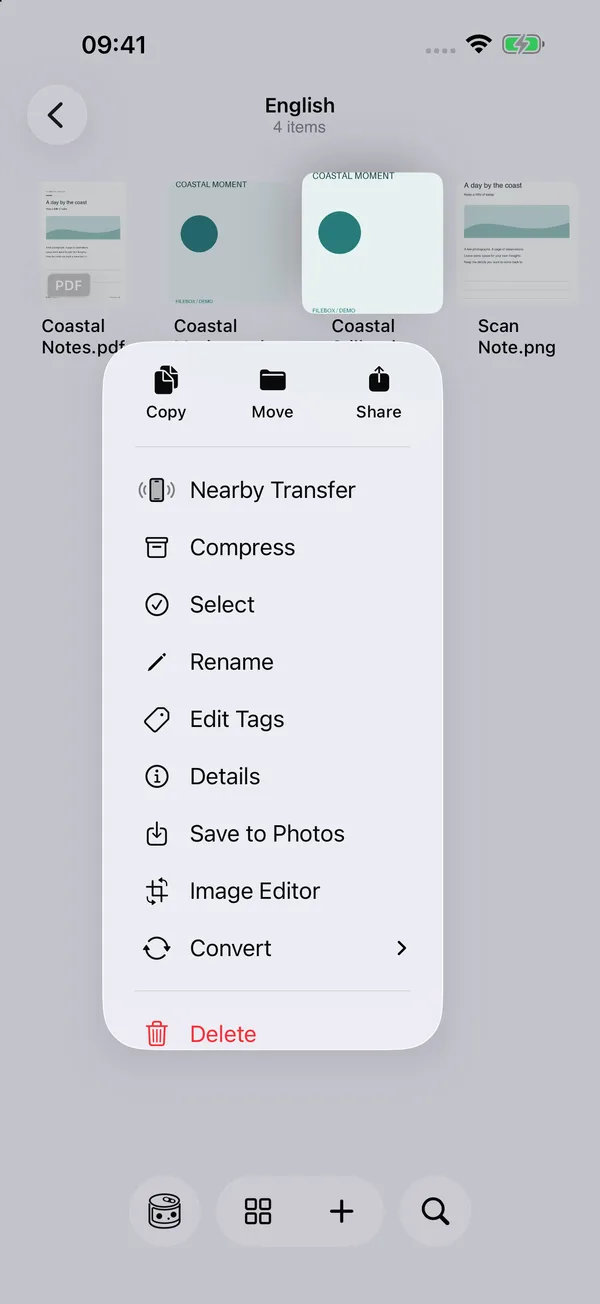
File context menu / image viewer More menu → Convert

What you can do
Available formats depend on the source. Convert static WebP to JPG and animated WebP to GIF, Live Photo or video. Convert GIF to Live Photo or video, and Live Photo to GIF or video.
How to use it
- Long-press a supported image in the file list, or open it and use the More menu.
- Open Convert and choose an available output. WebP options depend on its actual frame count.
- Wait for conversion to finish. The result is saved in the source folder, keeping both files if a name already exists. The original is kept.
- Open the result to check its appearance and animation, then share it or use Save to Photos for supported results.
Before you start
Not every image supports every output format. JPG cannot preserve transparency. Check the exported animation or Live Photo; a Live Photo needs both its image and paired video.
Writable sources in authorized device and iCloud folders are supported. Cloud files need their contents prepared first, and saving does not mean iCloud uploading has finished. To turn a video clip into an animation or Live Photo, see Video to Live Photo / GIF.